the xx

photo - me (nikon d40x)
x - 3ds max
post production - photoshop

i cant seem to get over this picture!


racing suits

so im back in Dubai!
having a great time, warmth, sun, car and amazing food!
(haha had to make you jealous :P)

Dad asked me to design some racing suits for his clients
this is what came out!


SPP3 Exhibition Package

Catalogue text - Rahul Ganwani is a multimedia artist specializing in Architectural Visualization. During his time at Nottingham Trent University, he has become an avid multimedia designer with experience in Autodesk’s 3Ds Max, AutoCAD, Adobe Creative Suites 4 and Unity 3D. Born and brought up in Dubai, a multi-cultural city with immense prospects in the architectural field; Rahul intends on using his knowledge in creating User Interactive Walkthrough’s to improve the field of visualization.

Images:


Client Project - Final

I have completed a whole visualization package for my client, Chawla Artchitects.
They supplied me with the technical drawings and asked me to create the exterior of the buildings and place it in a community type space.


Technical Drawings:


Type A Elevations


Type A Floor Plans


Type B Elevations


Type B Floor Plans


Final Site (Community)


Visualization Images:


Type A front + back


Type B front + back


Type AA front + back


Type BB front + back


View 1 and 2


View 3 and 4


View 5 and 6


View 7 and 8


3D Video


User Interactive Walkthrough

Click here to download User Interactive Walkthrough for Mac


Click here to download User Interactive Walkthrough for PC

Client Project - User Interactive Walkthrough

I have now created a community using Unity3D
this is a user controlled program, it is a standalone program that runs on windows and apple.


Click here to download User Interactive Walkthrough for Mac


Click here to download User Interactive Walkthrough for PC


Hope you like it! :D

PRP Artefact 4


Click here to download User Interactive Walkthrough for Mac


Click here to download User Interactive Walkthrough for PC


For the fourth artefact, I wanted to incline more towards a point. In order to do this, the product I created is a detailed user interactive walkthrough. My intended audience for the artefact is 10 males above the age of 30.
I created a questionnaire that would enable me to understand what opinions the users might have;
• 80% of the users said that the user interactive gives them a sense of what the proposed design would look like in real life.
• 60% of the users would prefer the user interactive for interior design.
• 70% of those users would want their own interior designs created by the visualization artist through live conversations.
• Only 50% of the users could spot changes to the exterior design of the house. This was due to the educational version not having shadows.
• 60% of the users would pay to get a user interactive walkthrough created for them.
• Upon asking specific directed questions about the interior and exterior, I found out that 60% of the users find the user interactive beneficial towards interior and exterior.

The problems that I faced during this artefact are, the older users find it hard to understand .zip files. Most users did not have time to go through the work unless it was their house being created. Some users could not find the first staircase in the User Interactive; to fix this I add a painting by the stairs to create curiosity. The biggest problem I faced was not having an option of using shadows. They help conceptualize the design on the user interactive.

For the next project, I intend on interviewing a few important roles in an architecture company. I will provide them with my client project as my artefact and then accordingly interview the owner, an architect and a visualization artist.


Client Project - visualization images 2

I have taken more pictures of my community from different angles. This is to give a better idea of what the compound looks like.


View 1


View 2


View 3


View 4


View 5


View 6


View 7


View 8

UI Practice
I have been practicing using Unity 3D
This is an interior video i have done for PRP artefact 4
I have now masered the use of the First Person Controller, Movement and View of the user.
here are the links


Click here to download User Interactive Walkthrough for Mac


Click here to download User Interactive Walkthrough for PC

Client Project - visualization images

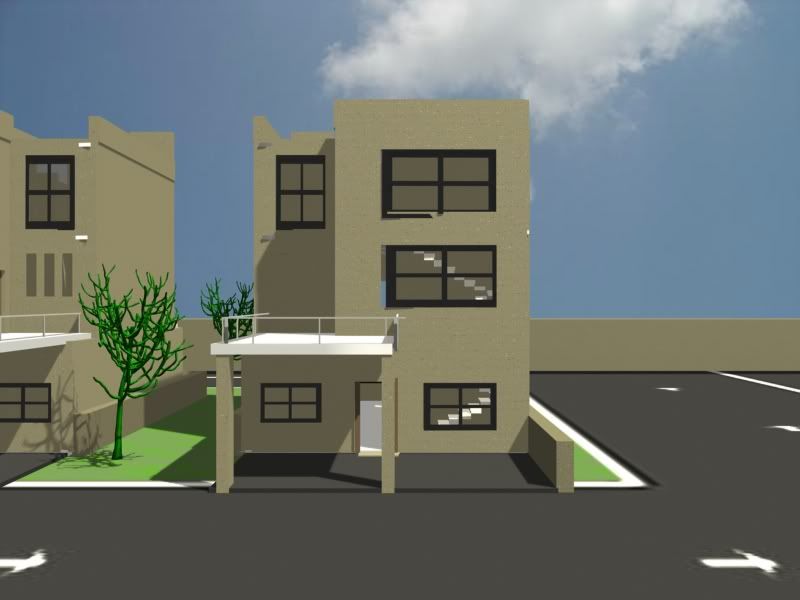
I have now put the 4 types of buildings into a community.
here are the final images of the villas with textures and lighting.


Type A front


Type A back


Type B front


Type B back


Type AA front


Type AA back


Type BB front


Type BB back

Client Project - AA and BB

upon looking at the final site drawings, Type A and Type B have double designs as well which become A+A and B+B. here are the images


Type AA front


Type AA back


Type BB front


Type BB back

For the community, i created this on photoshop to be the ground. it will be used in 3ds max and unity3d.


I have also been practicing Unity 3D. It is a program that allows you to create user interactives. I have used my first attempt in my Personal Research Project, Artefact 3. here are there walkthrough links.


Click here to download the User Interactive Walkthrough for Mac


Click here to download the User Interactive Walkthrough for PC